Who woulda thought that September would arrive, we’d begin prepping our Mason jars for the winter pickling and SolidWorks 2012 would be released to the early adopting hoards of SolidWorks users. Like many thing that come with a change of season, SolidWorks has fermented this release with tools taunted at SolidWorks Worlds of year’s gone past. Tools that go beyond modeling alone. You won’t see any massive shift to cloud based design, new OS support or a platform independent version, but you will get an increasingly utilitarian tool set good enough for machine design and product design alike. Here’s a quick look at what SolidWorks is packin’ into the pickle jar this year and how it’s set up to bring some sweet optimization to your current workflow.
SolidWorks 2012: Hot, Fresh Download
If you’re shackled to subscription service, SolidWorks 2012 PR1 is available right now to download. Now, you could visit the SolidWorks 2012 site, but you’ll have to give up your name and email to see it all. So, we’ll hit the highlights here and provide some additional insight to get you up to speed on what to expect when that download notification pops up.
SolidWorks 2012: Beyond Modeling Features
Tools that have nothing to do with modeling? Are they needed? You may be surprised. SolidWorks has (finally) integrated four such features and a slew of updates that deliver more than another way to create geometry. I say integrated, because they certainly blend right into the existing modeling process and are used in a similar way to how you likely already work. Some of these you’ll recognize as a direction SolidWorks has been heading for years and others you’ll wonder why it’s taken so freakin’ long to get there.
SolidWorks 2012: The standout features
- Costing
- Feature Freeze
- Large Design Review
- Equation Editor
Costing
Costing is a (fairly) simple tool that is really just extremely powerful for both designers and engineers to grasp the idea of what manufacturing methods could cost. You’ll have some setup intially, if you want templates that represent your actual manufacturer and manufacturing process, but the examples are adequate enough to provide examples. There definitely needs to be an option to copy a template though. Once SolidWorks ties this in with Sustainability, then you’ll really have a practical tool for developing material and manufacturing choices.


Feature Freeze
Once enabled (Tools, Options, General, Enable Freeze Bar), you can stop the model from rebuilding at any top level feature you like. It’s like the rollback bar at the bottom of the FeatureMananger, but opposite and can be saved with the part. This can both speed up your process of opening a model, working on a model, and moving back and forth between models.

Large Design Review
Ok, we’ve had lightweight mode, quick view and speedpaks. Now, we have Large Design Review. One. Has. Got. To. Work. Well, for viewing, this certainly does the trick, WELL. This is brought in as an option (when you OPEN A FILE) to make opening a large assembly more like opening a part. The option shows up when selecting an assembly in the Open Dialog. This replaces Quick View/Selective Open. (You won’t mind.) You are able to measure, make section and hide/show components, but you can’t see assembly/part features or make them transparent. Great for, well, design reviews, but also for grabbing quick dimensions when the shop needs a measurement.

Equation Editor
You’ll need to dig into the What’s new to see everything that has been done to the Equation Editor. It’s completely revamped and if you’ve made heavy use of equations on the past, you’ll find this so much easier. Solve order is automatic, so you don’t have to think about it. You have an option for automatic rebuild while working with equations. You can now link to external files easily. You can view the equations by equation, dimension or solve order. These are just some of the features you’ll see with the new Equation Editor.

The little feature that matter
There’s also the little features. Of course all the new features matter for those who really need them, but these in particular have been needed for a while.
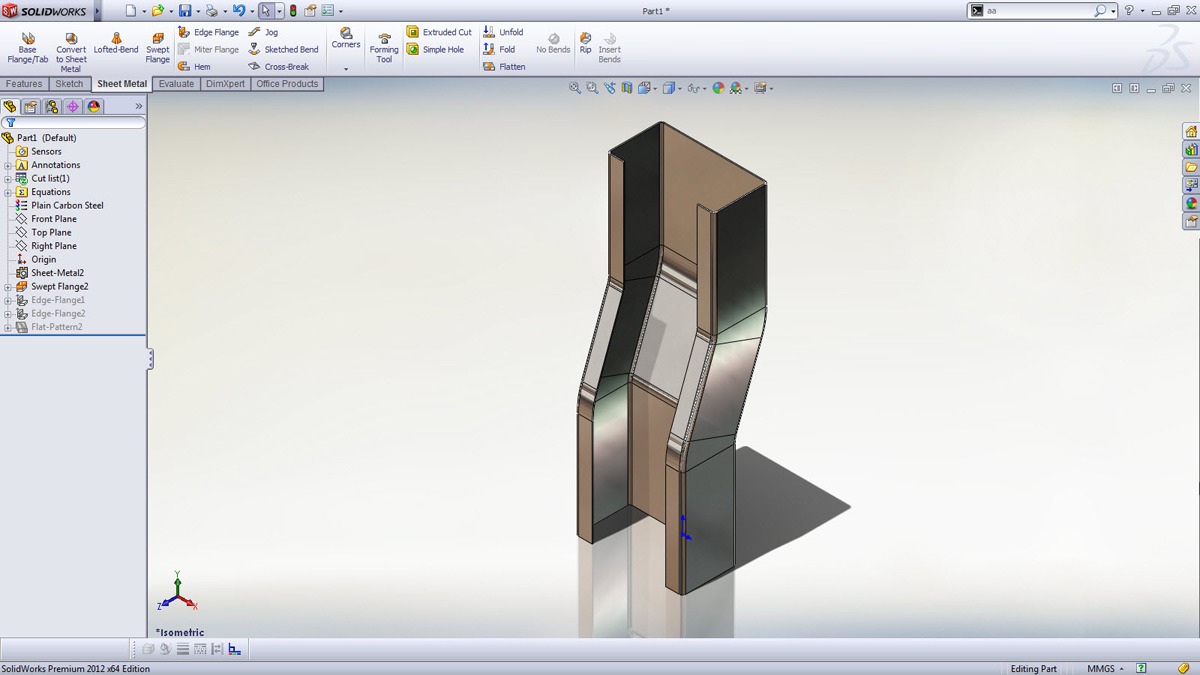
- Swept Sheet Metal Flange
- Real Dual Screen Support
- Iso Exploded View
- Open sub-assemblies from drawing
- BOM’s on inactive sheets
- Align balloons with lines
- Multibody Part Exploded view
- Ctrl-A to select all
- Commands via Search
- Clean Uninstall

The Smack
It’s quite odd, and I say it each time SolidWorks comes out with a new version, but it’s surprising what you miss until you don’t have it. One of my favorite ways to test a new version of SolidWorks is to use it, then go back to using an older version. That’s where I see if there’s actual value in the features and improvements that have been added. In the case of SolidWorks 2012, they’re some I have wanted for a long time and would get frustrated to do without. They speed up the design workflow and make the end product, whether it’s a drawing, a review or direct manufacturing, much quicker and less painful to get to. Some features that did not make it this time are Clean Uninstall, Angle Mates that don’t flip and converting a Solid to Surface without the rigors of offsetting and deleting faces. To get an overview of more features coming to SolidWorks 2012, the SolidWorks 2012 online help file is available to search and peruse. Are you happy with the features you see in SOlidWorks 2012?